Sunday, May 11, 2014

Oppo Find 7a thoughts.

Chinese manufacturer Oppo may not be to recognizable here in the states, but back in Chine, they are a well known top phone manufacturer. Their most recent run in the flagship smartphone game, the Find 7 and Find 7a, definitely doesn't skimp on anything either. I have been using the Find 7a for the past couple of weeks as my daily driver and I have been very pleased with the device so far.

With the Find 7a, Oppo's lesser version (though it can still compete with any company's flagship phones right now), comes with a 1080p Full HD display, Snapdragon 801 processor, 2GB of ram, 16GB of internal storage with an expandable micro SD storage slot for cards up to 128GB, and a removable battery. As you can see, the little brother of the Find 7 is no slouch. The Find 7a also comes with Oppo's Color OS, their version of Android. While it is definitely not the worst version of Android I've used (sorry Samsung, TouchWiz is terrible...), it was easily not the best either. They add a lot of customizations, but also a lot of bloat. There is a theme section that will let you change the entire look of the phone with other Oppo themes. However, they were all too cartoon-ish for my taste. If you have ever seen or used MIUI, then you will be right at home with how most of the themes look.

I was very pleased with the camera on the Find 7a. The shutter speed was instant and the Ultra HD option in the camera app to take 50MP images looked great. See below for some samples:
Pic 1Pic 2Pic 3Pic 4

Two of my favorite features are the fast charge they added, and the notification light dubbed Skyline Notification. Their fast charge is not only a feature they market, but completely true. Included in the box is a brick plug in USB charger that ups the output from the normal 1A of charging ability, to 4A! Oppo says that a 5 minute charge will let you make a two hour phone call, and a 45 minute charge will bring your battery from 0% to 75%. I can tell you, those claims are not lies or gimmicks, the fast charging is simply amazing. I remember getting home with 15% battery left from work, putting it on the faster charger and making dinner. When I came back, my phone was at 90%.

With all that said though, will I be sticking with the Find 7a for the foreseeable future? Sadly, no. There is a lot to like about this phone. The screen is great, fast charging, add on storage option, removable battery, skyline notification light, great camera; but there is nothing that sets it apart in my eyes. Oppo did a great job with the Find 7a, its just not for me.

Thursday, April 24, 2014

The best phone in the World!

The other day I was reading an article I found online from the New York Times talking about how the iPhone 5s is leaps and bounds above the new Galaxy S5 (5s, S5...that made me laugh), and that the 5s is the best phone in the World. Although I wouldn't say that the Galaxy S5 is the best phone out there, I couldn't disagree with this article any more. In my personal opinion, iOS is still lagging far behind Android in terms of software, and even Android phones made a couple years ago beat out the iPhone. Of course this is just my opinion. However, this got me thinking, is there a "Best Phone in the World"?

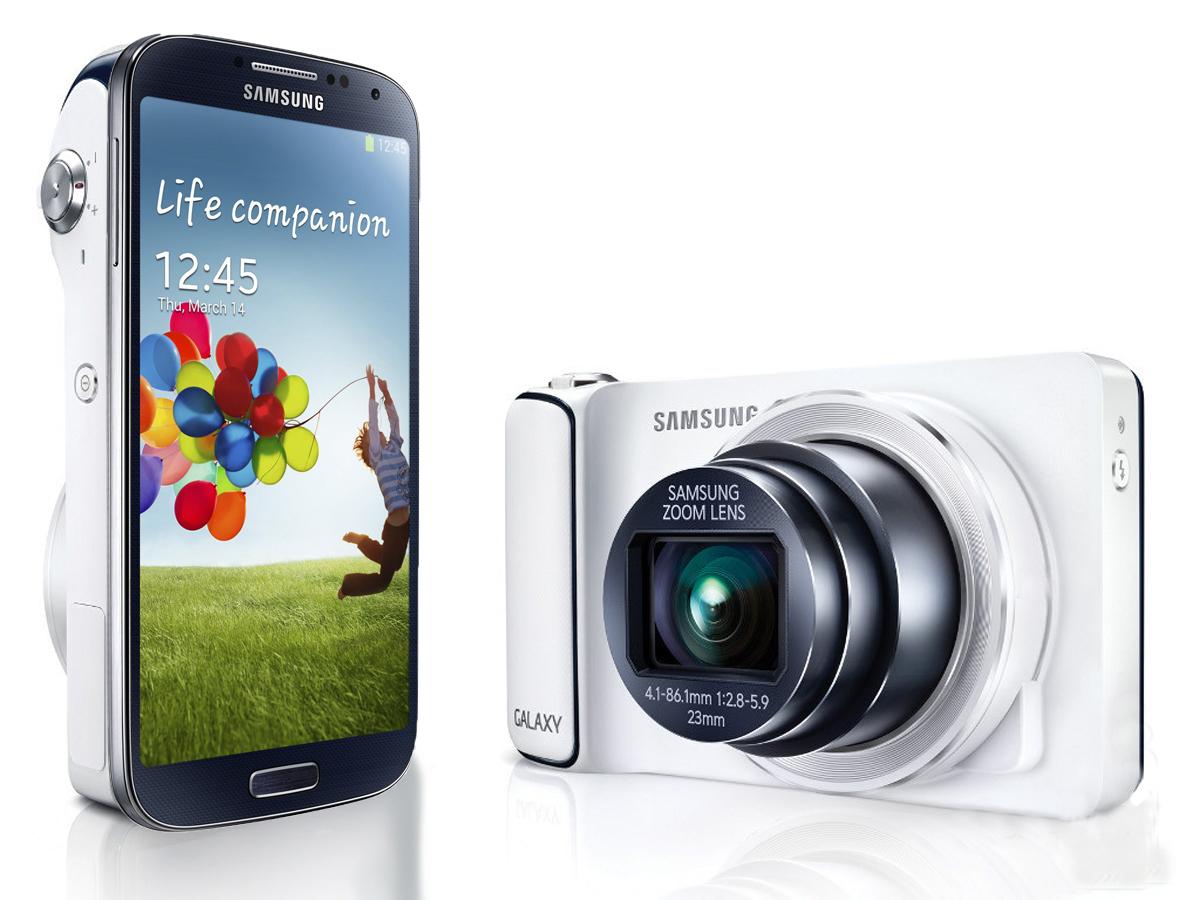
(The Samsung Galaxy Zoom. Yes, this is actually a phone)
Ask any friend with a smartphone and they will tell you how amazing their phone is. Why else would they have signed a 2 year contract for a discount on purchasing it, or spent the money to buy it at full price? Now, you could argue that they bought it because of a blind brand loyalty, and for some people that's very true. But not everyone walks into their local carriers store and plops down close to $200 on the newest model of their device without looking at other options. They want to find a device that will fit them and their day to day lives. What is most important part of the phone? The camera? User interface? Screen quality? Every person has different points of interest for the phone they want to buy. 

Finding a phone for you is strangely like finding a wife (or husband). Everyone knows that there is no such thing as the perfect woman; just the perfect woman for you. I believe that this also stands true that there is not such thing as the best phone in the world; just the best phone for you.
What is YOUR perfect phone?

Sunday, April 20, 2014

Oppo's Find 7a won me over.

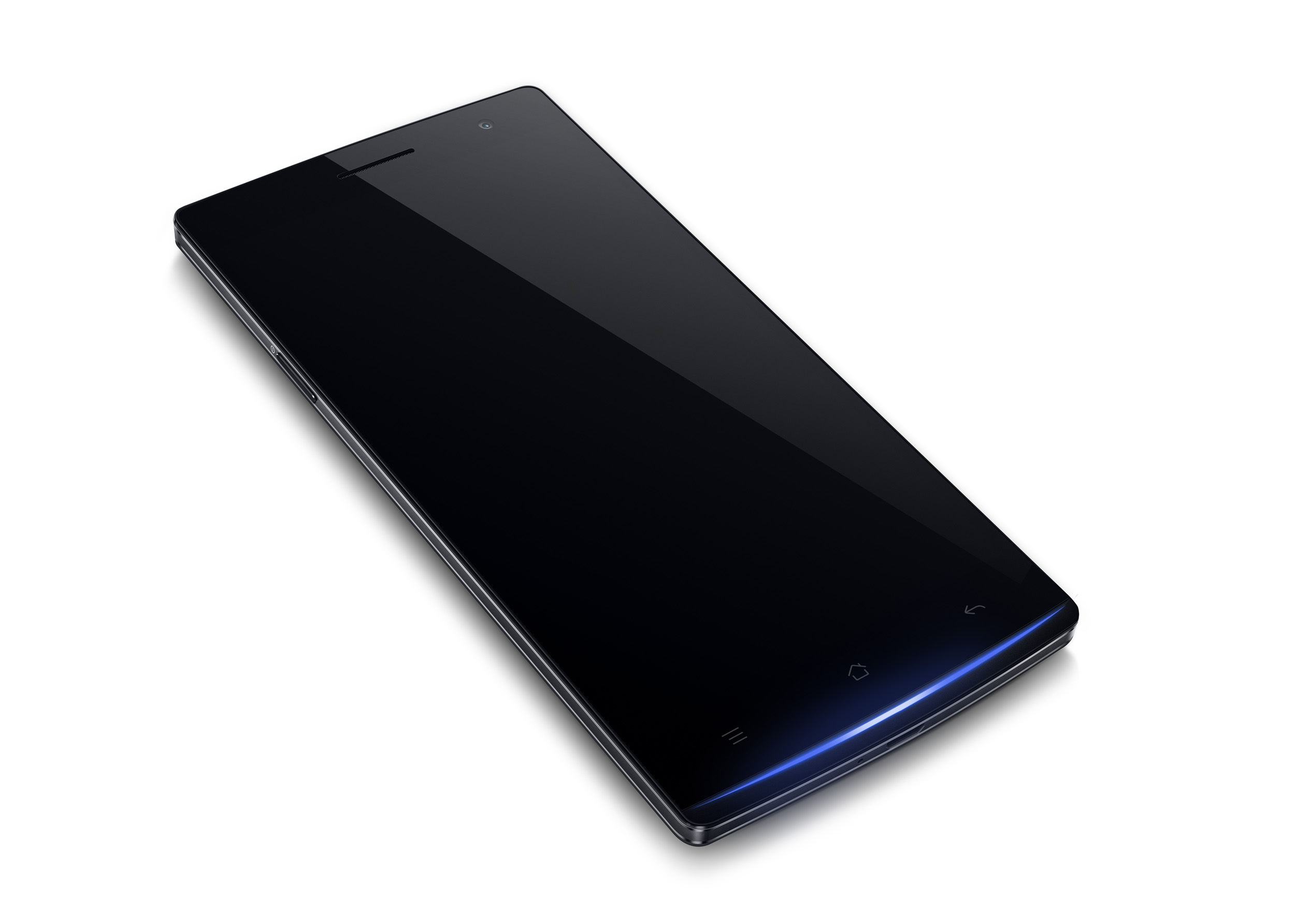
(Yes, the notification light is along the bottom of the phone, too cool)
I talked before about two little known manufacturers (Oppo and OnePlus) and how their upcoming smart phones really got my attention. Putting top notch specs in a phone that is very extremely well made and giving it an unlocked price of $499 was too good to pass up. Yes, $499 is a lot to pay for a phone, but take a minute to look up the unlocked prices (not subsidized by a carriers two year contract) of a brand new iPhone 5s or Galaxy Note 3 and you'll see its about $150 dollars cheaper. What really made me pull the trigger were the 'gifts' that Oppo is throwing in to people that pre-ordered their phone. An extra battery, a flip view cover, and a 32GB micro SD card are all included in that price. To buy those separately would have been close to $100. Their 13MP camera also really caught my eye, especially since it has the ability to take 50MP photos. Yes, you did not read that wrong, 50MP! It does this by using a pretty neat software trick. It takes 10 rapid shots, picks the best four, and then combines them into one clearer 50MP image. The results are actually very good, I will definitely post some samples once the phone arrives. Until then, I have to be patient while I look at all the photos and video reviews the Internet has to offer...*sigh*

Tuesday, April 15, 2014

Make your android, yours!

I posted an article a while ago talking about whether or not to root your device. In it, I talked about how not only are OEM's making it much less a need to root with all of the extras they are putting in their phones, but also because of all the customization apps that you can download right to your phone to make it so much more personal. I want to talk about one such app today; Themer.

Themer is an all encompassing home launcher replacement, meaning it will become what you see on your phone when you select it. Once you open the app, it gives you a very quick tutorial on how it works. From there, you are on your way to downloading your new home screen replacement.

 From the main menu, you are given options on how you would like to sort the themes it has, settings, sharing your theme on social media, setting it as the default home screen, and logging out. Once you download a theme it goes into your My Themes tab and you can quickly come back to one whenever you like. 

Changing between themes is almost too easy. Open the app, select a theme, download it, and your done. Themer also gives you the ability to set Gesture controls. These determine what happens when do things such as swiping up, swiping down, pinching in, and so on. For example, when swipe Up on my home screen, Google Play Music opens up without me having to interact with the app icon (or even looking for it). Below are just two themes that Themer has available, however more and more are added every day. 


I highly suggest you give Themer a try, you can download it for free here.

Sunday, April 13, 2014

A great experience with a mobile carriers customer service? You bet!

At the end of last week on Friday, I decided that I wanted to contact T-Mobile and request an unlock code for my device. For those that don't know, when you purchase a new phone from any carrier (T-Mobile, AT&T, etc), that phone is 'Locked' so that it can only be used on that particular network provider. When the phone is 'Unlocked', you can put any carrier SIM card in it and as long as the phone has the required frequency bands that your provider needs, it should work flawlessly. Anyone can contact costumer support for their network and request an unlock code, however there are certain requirements before they'll give that to you. They are all different so I suggest looking on their website if you are interested.
Now, I have heard horror stories about AT&T taking weeks to give unlock codes to people. On T-Mobile's website, it even stated that it could be 2-3 business days, so I was not expecting anything to happen overnight. However, that is exactly what happened. The woman I talked to was extremely nice and at the end of our conversation stated that I would be getting an email with unlocking instructions in the next few days. The very next day, I received an email with an unlock code and instructions on how to use it. I could not be happier with how easy and hassle free T-Mobile made it to unlock my G2. The Un-Carrier is easily continuing to make strides in the mobile world.

Saturday, April 12, 2014

Oppo and OnePlus have my attention.

The smartphone market is indeed a big one. Many manufacturers try and compete for your business. Most everyone knows the major players, Apple, Samsung, LG, HTC, Sony. But there are a few company's that make great phones that not many people are aware of. Oppo and OnePlus are just two this year that are really getting me excited.


Oppo's Find 7a is a great looking smartphone with top of the line specs. 1080p screen? Check. Great build quality? Check. Expandable memory? Check. With a price tag that's below most manufacturers flagship phones ($499 unlocked), they really want to make consumers stop and take notice.

OnePlus' phone (OnePlus One) has been able to stay very secretive. We know that spec wise it is easily among the top of the heap, but we have no idea what the phone actually looks like. With an April 23rd announcement coming around the corner, their under $400 phone is definitely in my sites.

Thursday, April 10, 2014

My Windows Phone 8 adventure

My time with Windows' mobile OS has come and gone. Many people (yours truly included) read and talk about other mobile OS's without ever trying them. We discuss what we like about them and what we don't like, all from articles we have read from other people. The past week I decided to really put up or shut up and give WP8 a real try, using it as I would my own personal phone. Read below to find out my final thoughts about my time spent with the Lumia 521.


(WP8 Live Tiles)
As soon as you turn on the phone and swipe up to unlock it, you know you're using a Windows phone. Their live tiles really are unique to just them. You'll know right away why they call them Live Tiles by just looking at the People tile. The tiles rotate vertically to give you new pictures of people in your contacts without ever needing to interact with it. Email tiles will show you how many unread emails you have, and the text messaging tile will show you an unread amount along with a brief preview of the message. Not all tiles are Live, and it is up to the developer of the app to include this feature if they wish. Customizing the start screen is very simple. Find a tile you like, select the size that you would like it to be (small square, medium square, or large rectangle), and move it to the place on your screen you would like. You can also change the color of your theme by going into settings>theme. I noticed several times however that they have yet to completely perfect the way moving tiles effects other tiles around it. More often then not, when I decided to move a tile from one place to another, I had to completely update every other tile since they don't wrap around my update. Several times I would end up with blank spaces and off centered tiles.


(All apps list)
Windows definitely wanted to keep their OS extremely simple, swiping from right to left will reveal the only other page you have, this is where a list of all your apps are located in alphabetical order. If you wold like to 'Pin' an app to the start screen, you simply need to hold down the selected app until a drawer shows beneath it, asking if you would like to pin it or delete it. Easy? Absolutely. Sadly though, there is no way to create a folder to put on your start screen. This becomes extremely annoying when you want to group certain apps together, but can't. A good example of that is the Game tile. Windows automatically puts all downloaded games into this tile, regardless of what you would like to do with them. Games also do not show in the all apps drawer, they are placed only in the Games tile. I personally like to group certain games into folders depending on what style of game I want to play at the moment. Having every single game located in the same place can be nice, but also very irritating.

(Text messaging app)
The text messaging app is probably the one app that I had the most issues with. This is probably due to the fact that it is the app that I use the most so I see it very often. The messaging screen is very static and dull with just names and the last text sent or received. Opening up a text message reveals the conversation in different tones of the same color. The on screen keyboard was my biggest annoyance. I felt like the keyboard was rushed and not really thought out. The keys are very tall and skinny, and the action buttons were located below the keyboard. The space bar itself is a problem due to the fact that it is not centered, and pressing the comma or emoji button happened more often than not. There were multiple occasions where an accidental press sent my message, or I was brought to the attachment page because the buttons are right below the space bar.

If you've ever read anything about WP8, then you have definitely heard the outcry for the lack of apps it has in its store. While this is very true and I had an extremely hard time finding apps that I use on my G2, I don't think that the lack of apps is the biggest problem. In my opinion, the quality of the apps is by far a bigger problem. Apps that I use on Android that I found in the Windows store (Ebay, Redbox, Netflix, Slacker Radio, IMDB) were very poorly made and often times crashed. Using the Redbox app recently, it continually crashed on me throughout my search/reserve process and I was never able to reserve a movie. Slacker Radio would stop streaming music constantly and I would have to completely re-open the app and select the radio station I wanted again. With the IMDB app, I never was able to find where to view the trailers for movies that were out in theaters. These are just a handful of my app experiences, but sadly they aren't the only ones.


(Brightness Setting)
 When it was time to change certain settings (WiFi, screen brightness, bluetooth, etc.), things weren't so cut and dry. WP does not have an action center to quickly toggle these setting. Any time you would like to do that, you would have to go into the settings menu, find the setting you were looking for, select it, and then change it from there. I ended up downloading a battery tile that was like the middle man between me and settings. I still had to select the exact setting I wanted, but they were all located in the same place. When wanting to change the volume, things got a little murky. There is no distinction between ring tone and media volumes. If you want your ring tone to be at the loudest setting, when you open a game, the game will be playing at the loudest volume as well. The only thing you can change is whether you would like the phone to vibrate and ring, or just vibrate. With brightness, there is no slider or percentage tracker, just a simple low/medium/high box or auto setting.

(Facebook notifications)
With all the negatives and things that I didn't like about the OS, there are definitely parts of it that Windows did a very good job at. Fluidity of the software is definitely one of them. While browsing through tiles or the app drawer, I never saw any stutter or lag. This also rings true when going from any app back to the home screen when pressing the Windows key. The animations back were always smooth and consistent. Facebook is another aspect that it absolutely does right. Once you add your Facebook account to your phone opening up the People tile takes you to your contacts list, but swiping over reveals all your Facebook notifications. From here, you can post, like, or comment on Facebook without ever opening the app or going on the web. This makes things extremely fast and easy for the social media minded person.

There is a lot to love and hate about Windows mobile operating system. There are certain aspects that I can see why people are inclined to buy there handsets, but there are a lot of negatives as well. This article only briefly touched on the OS as a whole. But with the week I spent with it, I can officially say that it is not for me. By day two I was bored with the customization options available, along with the lack of apps and the inability to change certain aspects of it (Browser, Keyboard). It is by no means a bad operating system, but it is far from great. If you are planning on purchasing a Windows Phone 8 in the near future, I just have one thing to say; I hope you like squares!